
Open the demo restaurant — guest menu preview
More revenue per table.
Less stress in daily operations.
Beezbites turns your restaurant into a digital ordering and sales channel: from the QR code on the table to repeat visits, delivery, and additional revenue streams under your own brand.
The result: more add-on sales, calmer operations, and a direct channel to your guests.
- €0 setup fee
- €0 base fee
- Commission only on revenue
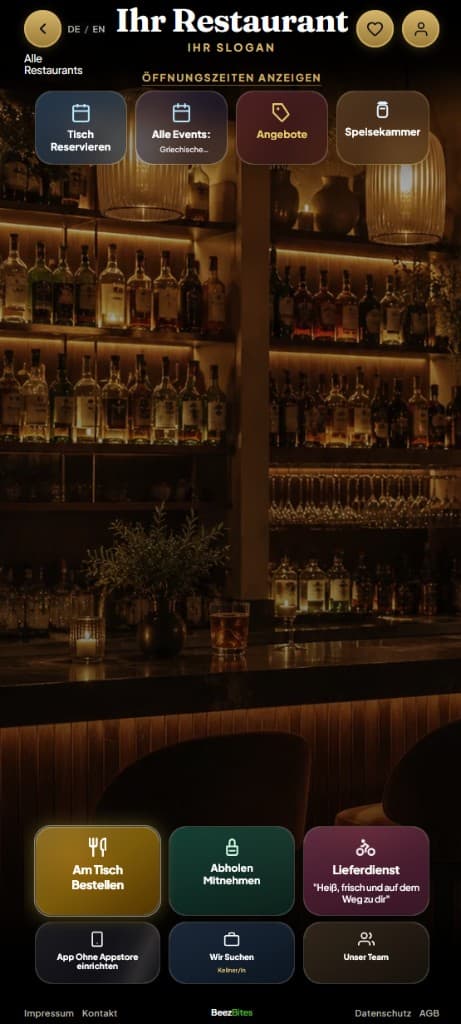
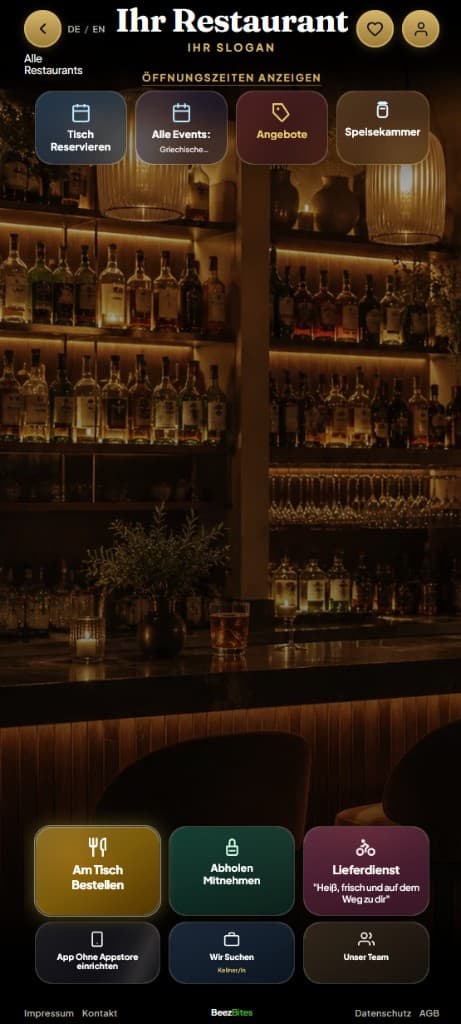
The problem
Revenue is lost at the table.
In everyday operations, revenue is lost even though quality is right: service takes time, guests wait for their order or the bill, and add-on sales get missed, especially during rush hours.
Your team is tied up with service and has little time for add-on sales.
Guests wait for their order, a reorder, or the bill.
During rush hours, dessert, a second drink, or extras get skipped.
Existing systems record processes but don't actively increase the check.
The solution
Beezbites turns every table into a digital ordering and sales channel.
The guest scans the QR code at the table, opens your digital menu directly, and orders without detours. The tab stays open during the visit and is only settled at the end.
More add-on sales
Matching drinks, sides, or desserts are recommended right at the moment of ordering.
Less pressure on service
Ordering and payment steps are reduced. Your team gains more time for guests and atmosphere.
Calmer day-to-day operations
Orders come in cleanly online, follow-up questions decrease, and rush hours are easier to manage.
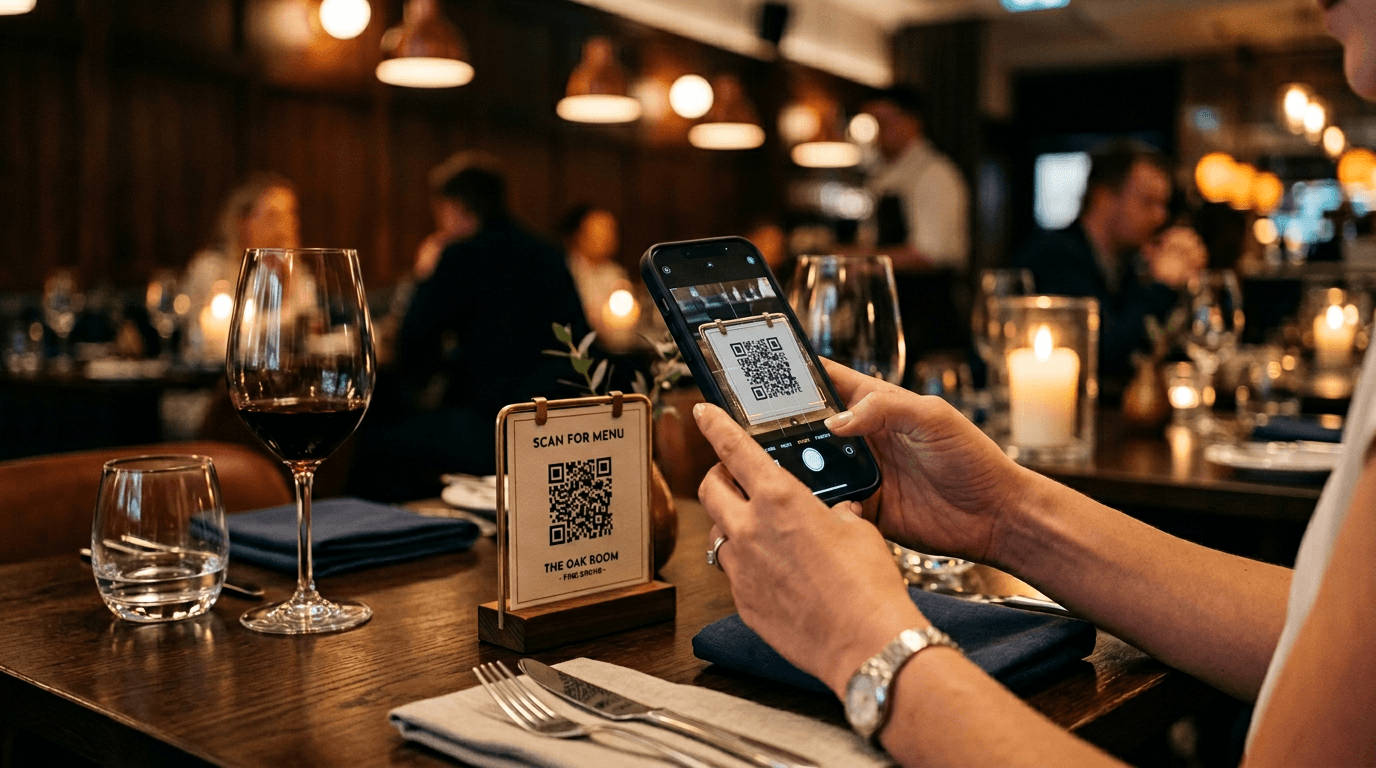
Flow including payment
From scan to checkout without breaking the guest experience.
Scan
The guest scans the QR code at the table and lands directly on your digital menu.
Choose & order
Dishes, drinks, and extras are clearly structured. Recommendations increase the chance of add-on sales.
Organise the shared tab
Multiple orders are combined at the same table. Before payment, guests can assign individual items or quantities to other guests at the table.
Split and pay your way
Once the other guests accept, everyone pays exactly for the items assigned to them — online at the end or the classic way at the register.
First flyers and table QR codes — fully done for you
We create your first flyers and individual QR codes for every table — print-ready, tailored to your venue, and ready to place at the table. You start without layout work or technical setup on your side.
All features at a glance
From the table to the dashboard — all in one system.
Ordering, service, kitchen, analytics, and setup: the key modules at a glance.
Service & revenue at the table
- QR ordering without an app
- Smart recommendations
- Split the tab and pay precisely
- Pay for others at the table
- Call service digitally
- Register station → kitchen, bar & service
- Analytics with a comparison group
- Allergens, ingredients & diet filters
In day-to-day operations
- Flexible payment
- Shared table session
- Online reservations
- Delivery & pickup
- Pantry shop
- Special requests per item
- Drink sizes & portions
- Search the menu
- Manage rush hours
- Low data usage
Growth & reach
- Platform visibility & favourites
- Events & offers
- Promotions & banners
- Team, jobs & shop pages
- German & English
- Channel per product
- Search insights in the dashboard
Setup & control
- Import & export your menu
- AI menu assistant
- Menu hours & daily dishes
- Steer recommendations precisely
- Delivery hub in detail
- Staff & roles
- Table plan & QR codes
- Professional dish photos
- Stripe Connect
- Go-live checklist
Backed by studies
The economic effects are measurable.
These effects are documented in industry data and studies.
Average check size increase: +9%Tap or click to expand
Toast (NYSE: TOST) analyzed internal data from thousands of restaurants and found that the average check for guests using mobile order & pay is 9% higher than standard dine-in. The increase comes from independent add-on orders: guests review the menu at their own pace and add extras on their own.
Source: Toast Inc. (NYSE: TOST), internal data 2021–2022, published via BusinessWire, May 2022.
Overall revenue increase: +10–12%Tap or click to expand
Beyond the check size alone, Toast shows that restaurants adopting order & pay typically see a 10% to 12% increase in overall volume. This combines higher checks with faster table turnover.
Source: Toast Inc., internal data (at least 12 months), toast.com/products/mobile-order-and-pay.
Dwell time drops by ~10%, productivity rises by ~11%Tap or click to expand
The methodologically strongest study to date: Tan & Netessine analyzed 2.6 million transactions across 66 locations of a US restaurant chain and found that tabletop technology reduces dwell time by about 10% (confidence interval: −9.94% to −9.54%). The combination of higher checks and shorter dwell time increased sales productivity (sales per minute) by about 11%.
Source: Tan, T. F. & Netessine, S. (2020). “At Your Service on the Table: Impact of Tabletop Technology on Restaurant Performance.” Management Science, 66(10), 4496–4515. Peer-reviewed.
Guest acceptance & return visits: ~80% positiveTap or click to expand
In a study covering 1,343 transactions across 20 locations, over 70% of guests reported a positive experience with tabletop devices. About 80% said they would return to the restaurant because of the positive experience with the technology.
Source: Susskind, A. M. & Curry, B. (2016). “An Examination of Customers' Attitudes About Tabletop Technology in Full-Service Restaurants.” Cornell Hospitality Report, Cornell University.
Your brand and platform reach
Your own brand experience plus additional visibility.
Beezbites works on two levels: your restaurant can appear as its own branded view while also benefiting from additional reach through the Beezbites platform.
- Your restaurant appears as its own branded view.
- Guests can also discover you through the Beezbites platform.
- This way you combine your own brand with new customer acquisition in one system.
Beezbites as your restaurant website
Optionally, you can redirect your existing domain to Beezbites and manage your web presence centrally.
Beezbites is your branded restaurant page. If desired, you can redirect your existing domain entirely to it — guests keep using the web address they know and find opening hours, menu, reservations, delivery, events and table ordering in one modern, mobile-optimised web presence.
Consistently mobile-optimised
Large touch targets, fast load times and clear structure — built for guests searching for your restaurant on their phone while on the go.
Redirect your own domain
If desired, redirect your existing restaurant domain entirely to Beezbites — with no second website to maintain in parallel.
Always up to date
You manage menu, prices and opening hours in the dashboard — changes go live instantly, without a web designer or agency.
No app download required
Guests open your site directly in the browser — via link, Google search or the QR code at the table.
Typical visitor behaviour
How guests reach restaurant websites
Industry average for hospitality and local-business websites; the exact split varies by venue, location and channel.
If desired, Beezbites can serve as your central website — optionally with your domain redirected, mobile-optimised and without extra maintenance.
Pricing
For the platform, you only pay once revenue is generated.
Terms at a glance (Beezbites commission; Stripe separate)
- €0 setup fee
- €0 platform base fee
- On-site / table: 2.49% + €0.15 fixed fee per completed payment (once per payment, including when settled together)
- Delivery and pickup: 6.99% + €0.25 fixed fee per completed payment — Stripe in addition
Savings potential for delivery and pickup
Illustrative example: At a commonly market-typical commission of about 14% for simple ordering platforms, restaurant costs on a €25 order are about €3.50. With Beezbites (6.99% + €0.25 plus Stripe, typical DE/EEA guide about 1.5% + €0.25) they are about €2.63 — roughly €0.87 less per order. At 100 orders of €25, that is about €87 savings potential per month.
Simple ordering platforms often also charge a service fee to the guest. Beezbites does not add a separate platform service fee for the guest; the restaurant costs shown (commission + Stripe) are transparent.
Illustrative calculation; market-typical portal terms and Stripe rates are indicative and contract-dependent. Specific portal terms are contract-dependent.
No fixed costs for the platform — remuneration is tied to revenue. Optional device rental is separate and can be cancelled monthly.
Billing details
- Commission applies to the recorded order value after discounts, including recorded delivery and service charges, but excluding tips — on-site / table: 2.49% + €0.15; delivery and pickup: 6.99% + €0.25.
- Tips go to you in full. Beezbites does not charge the percentage or fixed fee on tips. For online payments, Stripe fees are still charged on the tip portion of the payment amount — without additional Beezbites commission on that amount.
- When several table orders are settled online in one checkout, this is one commission-bearing payment — the €0.15 fixed fee is charged once (on the order value excluding tips).
- A cash payment for an order brokered through Beezbites and completed at the register is also subject to commission (order value excluding tips; rate by order channel).
- The restaurant bears Stripe fees in addition to the Beezbites commission. Typical DE/EEA card payments: about 1.5% + €0.25 per payment. Stripe fees also apply to the tip portion — with no Beezbites commission on tips.
- For cancellations, refunds, or chargebacks, non-refundable payment provider and reversal fees may be borne by the restaurant under the partner terms.
- You can optionally rent preconfigured Beezbites devices — from month two at transparent monthly prices, independent of order volume. Your own devices remain free. Details are in the hardware offer further down on this page.
Run the numbers for your business
Estimate incremental profit and ROI in a few steps based on revenue, fees and assumed uplift.
How to get started
From the partner form to an approved restaurant.
Your request creates your restaurant listing and access. You then complete the required information in the dashboard, test the guest journey, and submit your go-live request.
Request & access
Enter your business and contact details, confirm your email, and open the restaurant dashboard.
Business details
Complete your organisation, legal notice, opening hours, and restaurant presentation.
Offer & QR
Set up your menu, prices, ordering channels, and table plan — we create your first flyers and individual table QR codes in full; regionally we also provide the mobile photo booth with on-site training, free for 1–2 weeks.
Payments & contract
Connect Stripe Connect and accept the partner terms before taking real guest orders.
Review & go live
Review the guest view and workflows, request go-live, and welcome guests after approval.
Required before go-live
Complete business and legal-notice details, opening hours, a usable menu, table QR codes, payment setup, and accepted partner terms.
Depending on your offer
Configure delivery and pickup, reservations, team access, promotions, and other modules only when they fit your business.
Product photography
Professional dish photos for your menu
Strong product images drive orders — without an external photo studio.
Step 1
On-site training at your restaurant
We show your team how to set up, light, and use the mobile photo booth.
Step 2
Photo booth free for 1–2 weeks
The booth stays with you free of charge — enough time to photograph your menu at your own pace.
Step 3
Shoot & upload
Capture with a suitable smartphone; assign each image to a dish in the admin dashboard.
Step 4
AI-assisted image optimisation
Colours, presentation, and if needed plate or styling in the frame — applied automatically after upload.
What guests see is what they get
Menu and plate match: professionally presented, honestly depicted. The dish itself stays unchanged.
Currently available in the Gifhorn, Braunschweig, and Wolfsburg area.
Devices, KDS, and order workflow
Use your existing devices and release every order in a controlled workflow.
Beezbites adds a digital ordering channel to your POS setup. The register station remains the central control point between the guest order and preparation. You can use your own devices or add equipment through the hardware offer when needed.
Beezbites hardware offer
Use Beezbites flexibly with your existing devices or add preconfigured Beezbites devices to your setup when needed.
Device rental is separate from platform commission — it only applies if you use Beezbites devices, and regardless of order volume.
Free first month — test selected Beezbites devices with no rental cost in month one
Monthly device costs from month two
| Device | Monthly rent (net) | Buyout option after 12 paid rental months |
|---|---|---|
| Beezbites tablet | €15.00 | €60.00 |
| Beezbites smartphone | €10.00 | €60.00 |
| Tablet mount | free | included |
| Your own devices | free | n/a |
Recommended baseline setup
For smooth day-to-day operations, we recommend the following baseline setup — easy to expand or partly replace with your own devices:
Bar / register station
1× tablet
At the register station, we recommend one tablet for release, overview, and control of the order workflow.
Kitchen
1× tablet
In the kitchen, we recommend one tablet as a KDS view for incoming orders.
Service
1× smartphone per server
In service, we recommend one smartphone per server for floor work, pickups, and guest contact.
More details on the hardware offerTap or click to expand
Your own devices and Beezbites-provided devices can be combined freely. You only pay for the devices you actually need.
Free first month
In the first month, we provide your selected Beezbites devices completely free of charge. This lets you test the devices and the Beezbites platform in live restaurant operations without additional hardware costs.
Example setups
The recommended baseline setup can be expanded as needed — example costs:
| Setup | First month | From month two | Buyout after 12 paid rental months |
|---|---|---|---|
| 1 tablet | €0 | €15 per month | €60 |
| 1 tablet and 1 smartphone | €0 | €25 per month | €120 |
| 2 tablets and 1 smartphone | €0 | €40 per month | €180 |
| 2 tablets and 2 smartphones | €0 | €50 per month | €240 |
| Your own devices only | €0 | €0 | n/a |
Flexible usage
- Your own devices and Beezbites devices can be combined freely.
- Individual devices can be added or returned at any time.
- Usage can be cancelled monthly.
- The free first month does not count towards the twelve paid rental months for the buyout option.
- Until buyout, the devices remain the property of Beezbites.
- Buyout is optional. Alternatively, devices can continue to be rented or returned.
Service and liability
- Devices are delivered fully set up and preconfigured for Beezbites.
- Tablet mounts are included free of charge.
- Technical defects without fault on your part are reviewed by Beezbites and replaced with a substitute device if needed.
- Normal wear and tear is covered by the monthly rental fee.
- In case of loss, theft, or self-caused damage, repair costs or current market value are charged.
- Devices not bought out must be returned in full with all provided accessories after the contract ends.
Your advantage
You avoid high upfront investments and can keep using your existing hardware. Missing devices can be added flexibly through Beezbites. The first month is free. After that, only manageable monthly device rental fees apply — with no long-term contract lock-in.
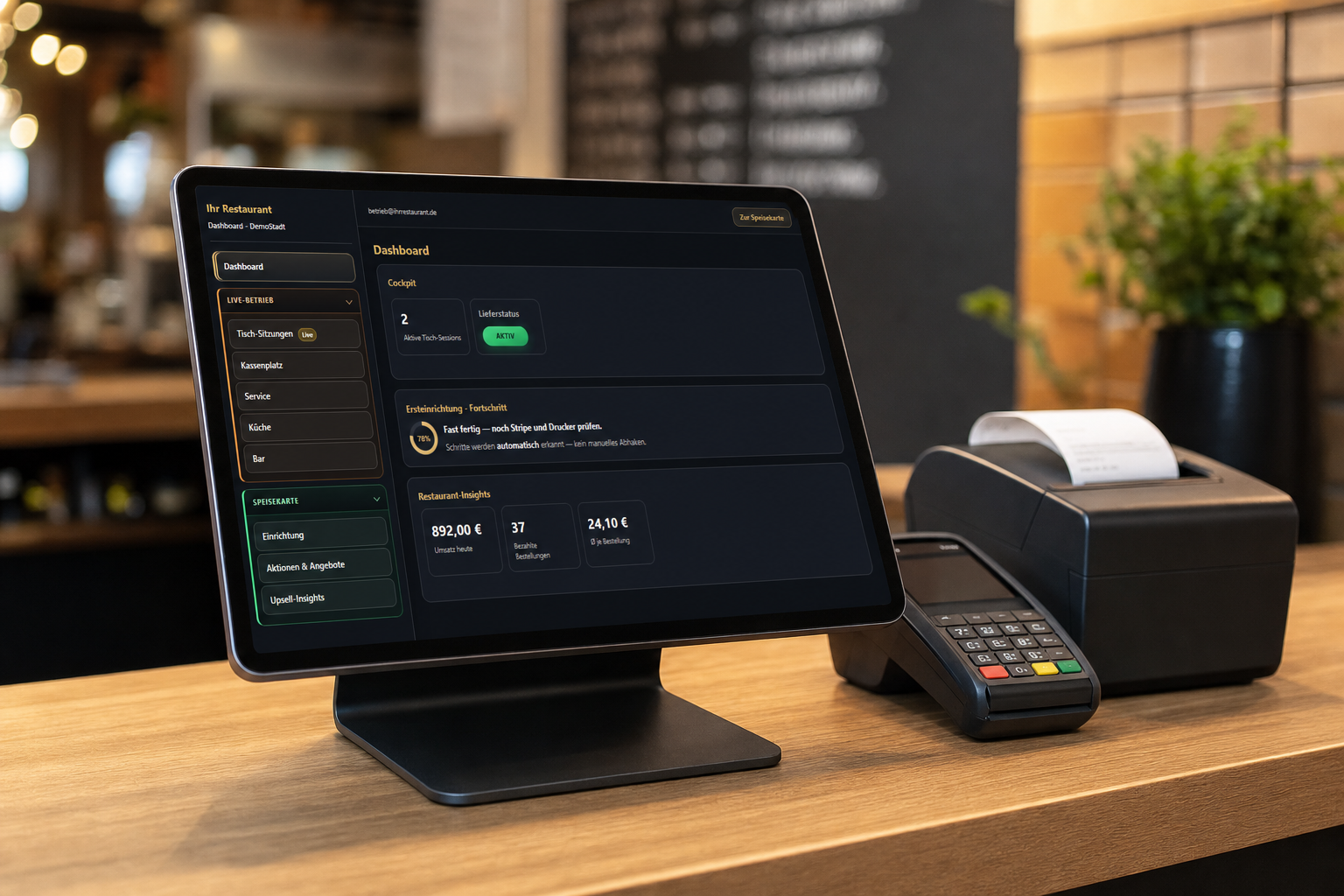
Register station with admin dashboard
Order is assigned
When the guest taps the final order button, a binding contract with your restaurant is formed. The submitted order arrives in the operation with its table and guest assignment — independent of the later kitchen workflow.
Arrives at the register station
Every order first arrives at the Beezbites register station, where the restaurant reviews it.
Entered into the POS system
The team enters the order into its own POS system at the register station. Receipts, fiscalisation, and POS bookkeeping remain there.
Released to kitchen and bar
Only then does the register station release the order to the kitchen or bar KDS for preparation.
Your own devices or Beezbites hardware
You can use existing Android or iOS devices or flexibly add preconfigured Beezbites devices where needed — see the hardware offer above.
Wi-Fi or mobile data
The restaurant can use Beezbites in service over its own Wi-Fi or mobile data. Guests do not need the restaurant's Wi-Fi when general mobile reception is sufficient. Beezbites is optimised for low data usage.
KDS for kitchen, bar, and service
Separate browser-based views support the register station, kitchen, bar, and service. Orders appear in the kitchen and bar only after the register station releases them — an operational step, not a second contract formation. Completed items and new service tasks are then grouped in the service board.
Import your menu
Existing menu data can be imported from CSV, JSON, XML, and text files. CSV columns can be mapped and the data reviewed before it is applied.
Analytics that make impact visible
Go beyond counting orders: understand how guests actually use Beezbites.
The partner dashboard combines operational metrics with interaction insights from the menu, search, and recommendations. Filters for period, ordering channel, weekday, and time of day help you put developments into context and take targeted action.
Revenue and operations
Revenue, paid and total orders, average check, tips, guests, and table sessions — including revenue per guest and session.
Compare periods
Compare results with the previous period or previous week and see percentage changes in revenue, orders, average check, and guests.
Guest and table behaviour
First menu opens, renewed activity, average session duration, and course combinations show how guests interact with your offer at the table.
Recommendations in detail
See how often recommendations are shown, accepted, or dismissed — with conversion per offer moment, successful direct links, and attributed upsell revenue.
Measure with a comparison group
A stable share of sessions receives no recommendations for testing purposes. The dashboard compares acceptance rates with and without suggestions instead of merely assuming their impact.
What guests search for
Top search terms, search frequency, average result count, and time-of-day analysis reveal demand, gaps, and opportunities in your menu.
Evaluate Beezbites with data
Interaction, revenue, and comparison data provide a sound basis for assessing Beezbites' contribution and the effectiveness of its recommendation logic — transparently based on data maturity and available attribution.
Support in your region
I'll personally guide you to a successful launch
In the Gifhorn, Braunschweig, and Wolfsburg area, I personally support you in rolling out Beezbites — from setup to go-live and through the first steps of day-to-day operations.
Your advantage as a pilot partner
Short response times, personal support, and the opportunity to actively help shape the future development of Beezbites.
Clear before you decide
The key questions about the pilot, requirements, billing, and responsibilities — transparent before registration.
What does being a pilot partner mean?
What must be set up before go-live?
When is commission charged?
Are there additional fees for online payments?
Do guests need to install an app?
Does Beezbites replace my POS system?
When is the guest contract formed — and when does the kitchen see the order?
Can I rent hardware from Beezbites?
Who contracts with the guest?
Is there a minimum contract term?
Start pilot
Create your restaurant listing and access — then complete the setup in your dashboard.
Registration
Register with email and password – or with Google.
Dashboard
Login opens the dashboard directly
Set up
Manage menu, design and workflows directly in the dashboard
Go live
Submit your go-live request — once approved your restaurant is online
Questions? Email us at [email protected] or use our contact form.